Building an Audio AI Agent with OpenAI Agents SDK & MC
Recently, we open-sourced a demo library that integrates the OpenAI Agents SDK with our audio processing engine, SonicAura, via the Model Context Protocol (MCP). Our goal was to empower AI Agents to handle heavy audio files (stem separation, denoising, MIDI export).
The Model Context Protocol (MCP) is rapidly becoming the standard for giving LLMs the ability to interact with the outside world. But when you move from simple "Hello World" demos to production-ready architectures, you quickly realize that LLMs are chaotic.
But we hit three massive walls: Context Limits, LLM Hallucinations, and Asynchronous Timeouts. Here is how we engineered around them, and how you can apply these patterns to your own Agent workflows.
The Challenge: Why Media Breaks Standard Agents
When you connect an LLM to an API, the temptation is to just pass the file path or a Base64 string directly into the prompt.
Do not do this for media files.
- Context Truncation: A 5MB audio file becomes a massive string that instantly blows up the LLM's context window, resulting in
Invalid JSONerrors when the model tries to call a tool. - The "Do-Everything" Trap: Initially, we exposed a tool called
process_audiothat accepted atask_typeparameter (e.g.,task_type="2stems"). The LLM constantly hallucinated this parameter, passingtask_type="separate_vocals"ortask_type="vocals", hitting validation errors, and getting stuck in infinite retry loops (MaxTurnsExceeded).
The Solution: A 3-Pillar Architecture
To make this production-ready, we completely re-architected the flow. The golden rule for MCP: Let Python handle the heavy lifting, and let the Agent handle the orchestration.
Pillar 1: Direct Upload (Bypassing the LLM)
Your Python environment generates a presigned URL from the MCP server (get_upload_url). Python then uses requests.put() to upload the heavy file directly to Cloudflare R2. The LLM never sees the binary data. It only receives a lightweight source_key.
Pillar 2: Atomic Tools (No More Guessing)
We killed the "do-everything" endpoint. We exposed 13 atomic, 1-to-1 semantic tools. Instead of guessing task types, the LLM now picks exact tools based on the user's intent:
extract_vocalssplit_6stemsexport_mididenoise_audio
Pillar 3: The **kwargs Armor (Absorbing Hallucinations)
Even with atomic tools, LLMs still hallucinate. They often try to pass redundant parameters just to "be safe." On the server, we wrapped every tool endpoint with **kwargs to silently absorb these phantom parameters.
On the client side, we wrote a foolproof check_task_status tool. It requires only the task_id, and automatically scans the cloud storage to return whatever files (audio, MIDI, chords) were generated.
The Code: Building the Agent
Here is how clean the implementation becomes when you follow these pillars using the OpenAI Agents SDK. Notice how we don't hardcode any JSON parameters in the prompt.
import asyncio
import os
from agents import Agent, Runner
from agents.mcp import MCPServerStreamableHttp

async def main():
    # 1. Connect to the Remote MCP Server
    async with MCPServerStreamableHttp(
        name="SonicAura",
        params={
            "url": "https://api.sonicaurastudio.com/mcp",
            "headers": {"Authorization": f"Bearer {os.getenv('SONICAURA_API_KEY')}"}
        }
    ) as sonicaura_server:

        # 2. Initialize the Agent
        agent = Agent(
            name="Audio Engineer",
            model="gpt-4o",
            instructions=(
                "You are an expert audio assistant. "
                "When you use a processing tool, it returns a `task_id`. "
                "You MUST call `check_task_status` with ONLY that `task_id` to poll for completion. "
                "Once the status is 'done', extract the download URLs from the `tracks` dictionary."
            ),
            mcp_servers=[sonicaura_server]
        )

        # 3. Natural Language Prompt (No hardcoded parameters)
        prompt = "Please extract the vocals (2 stems) from this audio: uploads/user_123/song.mp3"

        # High max_turns to accommodate asynchronous GPU processing
        result = await Runner.run(agent, prompt, max_turns=30)
        print(result.final_output)

if __name__ == "__main__":
    asyncio.run(main())
As you can see from the terminal execution below, the interaction is completely autonomous. The Agent reads the natural language prompt, picks the extract_vocals tool, and loops through the async polling until the files are ready:
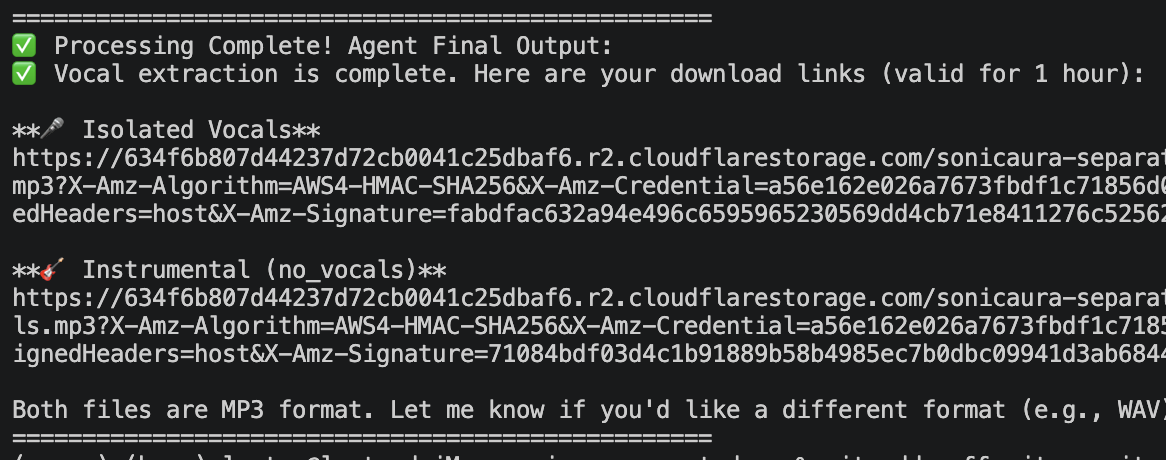 Success! The Agent bypasses LLM context limits and returns the final Cloudflare R2 URLs for both
vocals.mp3 and no_vocals.mp3.
Tool Chaining: The Real Magic of MCP
Because we designed the tools to be atomic, the Agent can now chain them together to solve highly complex workflows.
If a user says: "Extract the guitar track and add some studio reverb to it", the Agent will autonomously:
- Call
extract_single_instrument(instrument="guitar"). - Poll
check_task_statusuntil the guitar MP3 is ready. - Take the newly generated guitar URL, and feed it back into
apply_reverb(preset="studio_room").
This is the true power of Agentic workflows: Python moves the bytes, and the LLM orchestrates the logic.
Try It Yourself
Our open-source demo is officially verified on Glama.ai and is listed in the awesome-mcp-servers directory.
If you are building audio tools, or just want to see how production-grade MCP integrations are structured, clone the repo and give it a spin.